Redis 연결오류 해결기
사건 배경
심기가 불편한 일요일 오후 서버는 울기 시작했다.

“응애! 응애! Connection closed by server! 응애!”
서버의 웹훅 관련 캐시서버와의 연결이 끊어졌다는 오류들이었다.
웹훅을 수신하면 웹훅 캐시서버에 횟수를 기록하기 위한 작업이 이뤄지는데 이떄 서버로부터 연결이 끊겼다는 에러였다.
Traceback
 1
 2
 3
 4
 5
 6
 7
 8
 9
10
11
12
13
14
15
16
17
18
19
20
21
22
23
24
25
26
27
28
29
30
31
32
33
34
35
36
37
38
39
40
41
42
43
44
45
46
47
48
49
50
51
Traceback (most recent call last): File "/code/core/webhook/utils/webhook.py", line 156, in record_webhook_event redis_client.zadd(key, {member: score}) File "/usr/local/lib/python3.11/site-packages/redis/commands/core.py", line 4187, in zadd return self.execute_command("ZADD", name, *pieces, **options) ^^^^^^^^^^^^^^^^^^^^^^^^^^^^^^^^^^^^^^^^^^^^^^^^^^^^^^ File "/usr/local/lib/python3.11/site-packages/ddtrace/contrib/redis/patch.py", line 148, in _traced_execute_command return _run_redis_command(span=span, func=func, args=args, kwargs=kwargs) ^^^^^^^^^^^^^^^^^^^^^^^^^^^^^^^^^^^^^^^^^^^^^^^^^^^^^^^^^^^^^^^^^^ File "/usr/local/lib/python3.11/site-packages/ddtrace/contrib/redis/patch.py", line 128, in _run_redis_command result = func(*args, **kwargs) ^^^^^^^^^^^^^^^^^^^^^ File "/usr/local/lib/python3.11/site-packages/redis/client.py", line 559, in execute_command return self._execute_command(*args, **options) ^^^^^^^^^^^^^^^^^^^^^^^^^^^^^^^^^^^^^^^ File "/usr/local/lib/python3.11/site-packages/redis/client.py", line 567, in _execute_command return conn.retry.call_with_retry( ^^^^^^^^^^^^^^^^^^^^^^^^^^^ File "/usr/local/lib/python3.11/site-packages/redis/retry.py", line 65, in call_with_retry fail(error) File "/usr/local/lib/python3.11/site-packages/redis/client.py", line 571, in <lambda> lambda error: self._disconnect_raise(conn, error), ^^^^^^^^^^^^^^^^^^^^^^^^^^^^^^^^^^^ File "/usr/local/lib/python3.11/site-packages/redis/client.py", line 555, in _disconnect_raise raise error File "/usr/local/lib/python3.11/site-packages/redis/retry.py", line 62, in call_with_retry return do() ^^^^ File "/usr/local/lib/python3.11/site-packages/redis/client.py", line 568, in <lambda> lambda: self._send_command_parse_response( ^^^^^^^^^^^^^^^^^^^^^^^^^^^^^^^^^^ File "/usr/local/lib/python3.11/site-packages/redis/client.py", line 542, in _send_command_parse_response return self.parse_response(conn, command_name, **options) ^^^^^^^^^^^^^^^^^^^^^^^^^^^^^^^^^^^^^^^^^^^^^^^^^^ File "/usr/local/lib/python3.11/site-packages/redis/client.py", line 584, in parse_response response = connection.read_response() ^^^^^^^^^^^^^^^^^^^^^^^^^^ File "/usr/local/lib/python3.11/site-packages/redis/connection.py", line 592, in read_response response = self._parser.read_response(disable_decoding=disable_decoding) ^^^^^^^^^^^^^^^^^^^^^^^^^^^^^^^^^^^^^^^^^^^^^^^^^^^^^^^^^^^^^ File "/usr/local/lib/python3.11/site-packages/redis/_parsers/resp2.py", line 15, in read_response result = self._read_response(disable_decoding=disable_decoding) ^^^^^^^^^^^^^^^^^^^^^^^^^^^^^^^^^^^^^^^^^^^^^^^^^^^^^^ File "/usr/local/lib/python3.11/site-packages/redis/_parsers/resp2.py", line 25, in _read_response raw = self._buffer.readline() ^^^^^^^^^^^^^^^^^^^^^^^ File "/usr/local/lib/python3.11/site-packages/redis/_parsers/socket.py", line 115, in readline self._read_from_socket() File "/usr/local/lib/python3.11/site-packages/redis/_parsers/socket.py", line 68, in _read_from_socket raise ConnectionError(SERVER_CLOSED_CONNECTION_ERROR) redis.exceptions.ConnectionError: Connection closed by server.
웹훅 오류에 발작버튼이 달려있는 나는 황급히 웹훅 캐시 지표를 확인했다.
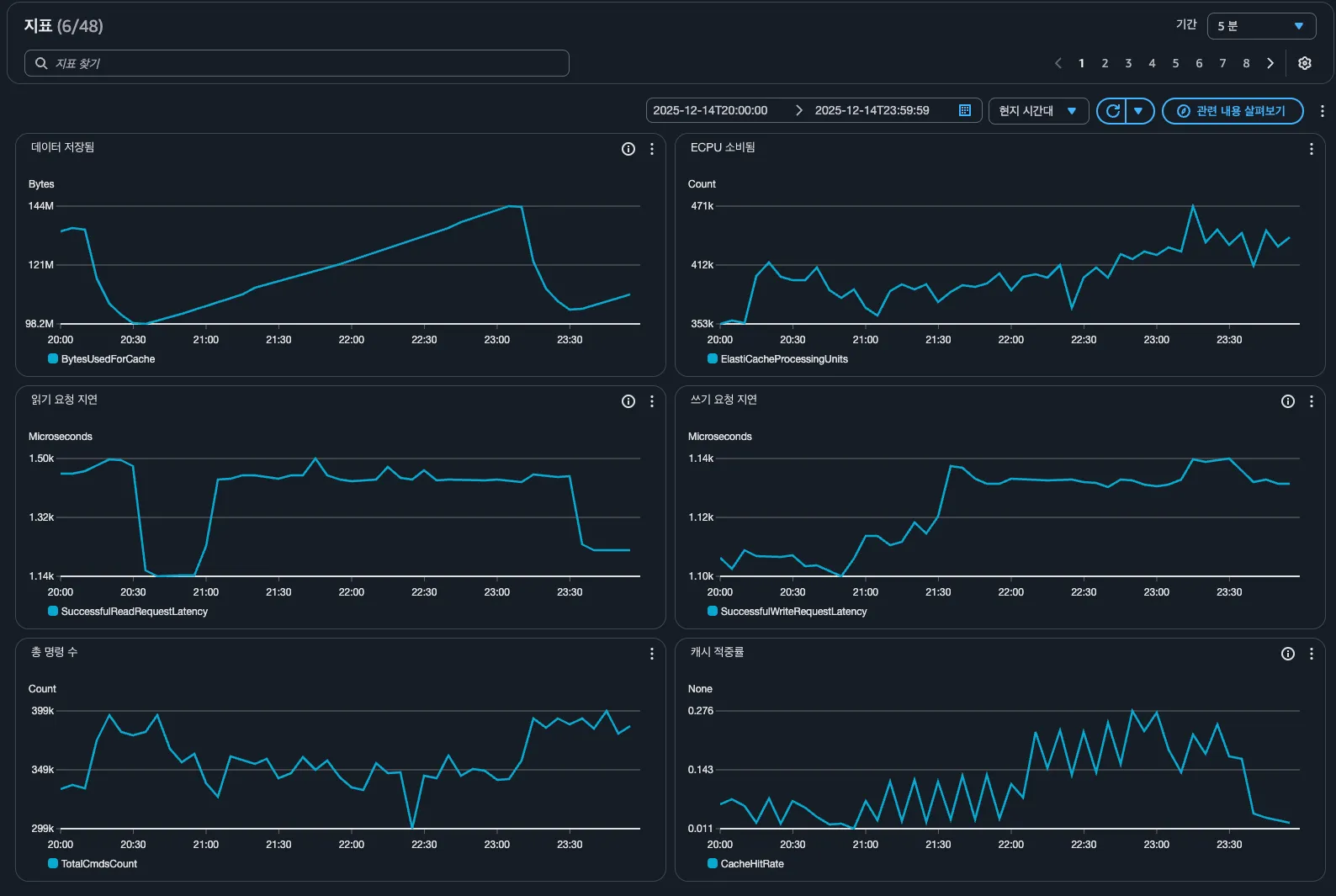
읽기 요청 지연시간이 잠깐 감소한 것 외에는 별 이슈가 없었다. 분명 그 시간에도 잘 처리되는 웹훅들은 존재했다. 아예 죽은 건 아니라 우선은 냅두고 내일 해가 밝으면 다시는 울지 못하게 해버리겠다고 다짐했다.
원인
오류가 난 함수
| |
개념
원인을 찾기 위해, 개념부터 명확히 이해해야 했다.
| |
┌─────────────┐ ┌─────────────┐ │ 우리 서버 │ ◀───── 커넥션 ─────▶ │ Redis 서버 │ │ (Django) │ (연결 통로) │ │ └─────────────┘ └─────────────┘
| |
┌─────────────────────────────────────┐ │ 커넥션 풀 (Pool) │ │ ┌─────┐ ┌─────┐ ┌─────┐ ┌─────┐ │ │ │ C1 │ │ C2 │ │ C3 │ │ …│ │ (미리 만들어둔 커넥션들) │ └─────┘ └─────┘ └─────┘ └─────┘ │ └─────────────────────────────────────┘
| |
[정상 상태] 우리 서버 ◀──── 🟢 정상 커넥션 ────▶ Redis 서버 (양쪽 모두 연결 상태 인식)
[좀비 상태] 우리 서버 ◀──── 🧟 좀비 커넥션 ─ ✖ ─▶ Redis 서버 (서버는 연결된 줄 앎) (Redis는 이미 끊음)
| |
개념 자체는 이해가 되었으나, 코어에서 발생하는 오류도 좀비 커넥션 때문인지 확신이 안섰다. 왜냐하면
- 해당 시간대는 웹훅이 가장 적은 시간대
- 그렇다고 연결이 쉬는 타이밍은 없으며 초당 수 십, 수 백개는 여전히 들어옴
- 모든 요청이 실패하는 것도 아님
라서.. 도대체 왜 좀비 커넥션이 그때 발생한 건지..
원인은 찾지 못했으나 증상은 알고 있고 해결해야한다.
해결책
해결방식은 사용하는 Redis 클라이언트 초기화 시점에 retry 옵션을 추가해주는 것이었다. 좀비 커넥션이든 뭐든 실패하면 연결을 재시도하라는 의미.
| |
이러면 첫 시도가 실패하면 0.1초 후, 0.2초 후, 0.4초 후, … 이런식으로 3회까지만 재시도한다(최대 1초)
테스트
이것이 해결책이 된다는 것을 확인하기 위해, 상황을 재현해야 했다.
- Redis 쪽에 직접 명령을 보내 연결을 끊어버린다(애플리케이션은 모름)
- Retry 옵션이 없는 Redis 클라이언트를 이용해 끊어진 연결로 데이터 추가 요청을 보낸다.
- 데이터 추가가 되는지 확인한다.
- Retry 옵션을 추가한 상태로 3을 확인한다.
면 알 수 있었다.
코드 확인
1 2 3 4 5 6 7 8 9 10 11 12 13 14 15 16 17 18 19 20 21 22 23 24 25 26 27 28 29 30 31 32 33 34 35 36 37 38 39 40 41 42 43 44 45 46 47 48 49 50 51 52 53 54 55 56 57 58 59 60 61 62 63 64 65 66 67 68 69 70 71 72 73 74 75 76 77 78 79 80 81 82 83 84 85 86 87 88 89 90 91 92 93 94 95 96 97 98 99 100 101 102 103 104 105 106 107 108 109 110 111 112 113 114 115 116 117 118 119 120 121 122 123 124 125 126 127 128 129 130 131 132 133 134 135 136 137 138 139 140 141 142 143 144 145 146 147 148 149 150 151 152 153 154 155 156 157 158 159 160 161 162 163 164 165 166 167 168 169 170 171 172 173 174 175 176 177 178 179 180 181 182 183 184 185 186 187 188 189 190 191 192 193 194 195 196 197 198 199 200 201 202 203 204 205 206 207 208 209 210 211 212 213 214 215 216 217 218 219 220 221 222 223 224 225 226 227 228 229 230 231 232 233 234 235 236 237 238 239 240""" Redis Connection Pool 좀비 커넥션 오류 재현 및 해결 방법 검증 목적: 1. 기존 설정에서 "Connection closed by server" 오류 재현 2. 신규 설정(retry) 적용 후 오류 해결 확인 """ import socket from django.core.management.base import BaseCommand from redis import Redis from redis.backoff import ExponentialBackoff from redis.exceptions import ConnectionError as RedisConnectionError from redis.retry import Retry from core.config.aws import ( AWS_ELASTICACHE_WEBHOOK_REDIS_HOST, AWS_ELASTICACHE_WEBHOOK_REDIS_PORT, ) from core.config.common import LOCAL class Command(BaseCommand): help = "Redis Connection Pool 좀비 커넥션 오류 재현 및 해결 방법 검증" def handle(self, *args, **options): self.stdout.write(self.style.SUCCESS("\n" + "=" * 70)) self.stdout.write( self.style.SUCCESS("Redis 좀비 커넥션 오류 재현 및 해결 방법 검증") ) self.stdout.write(self.style.SUCCESS("=" * 70)) self.stdout.write("\n[환경 정보]") self.stdout.write(f" - LOCAL: {LOCAL}") self.stdout.write(f" - REDIS_HOST: {AWS_ELASTICACHE_WEBHOOK_REDIS_HOST}") self.stdout.write(f" - REDIS_PORT: {AWS_ELASTICACHE_WEBHOOK_REDIS_PORT}") # ======================================== # 테스트 1: 기존 설정 (retry 없음) # ======================================== self.stdout.write(self.style.WARNING("\n" + "=" * 70)) self.stdout.write(self.style.WARNING("[테스트 1] 기존 설정 (retry 없음)")) self.stdout.write(self.style.WARNING("=" * 70)) old_errors = self._run_test(use_retry=False) # ======================================== # 테스트 2: 신규 설정 (retry 있음) # ======================================== self.stdout.write(self.style.WARNING("\n" + "=" * 70)) self.stdout.write(self.style.WARNING("[테스트 2] 신규 설정 (retry 있음)")) self.stdout.write(self.style.WARNING("=" * 70)) new_errors = self._run_test(use_retry=True) # ======================================== # 결과 비교 # ======================================== self._print_result(old_errors, new_errors) def _create_client(self, use_retry: bool) -> Redis: """Redis 클라이언트 생성 (단일 커넥션 모드)""" client_config = { "host": AWS_ELASTICACHE_WEBHOOK_REDIS_HOST, "port": int(AWS_ELASTICACHE_WEBHOOK_REDIS_PORT), "decode_responses": True, "single_connection_client": True, } if not LOCAL: client_config["ssl"] = True client_config["ssl_cert_reqs"] = None if use_retry: client_config["retry"] = Retry( ExponentialBackoff(base=0.1, cap=1), retries=3 ) client_config["retry_on_error"] = [ RedisConnectionError, ConnectionResetError, TimeoutError, ] return Redis(**client_config) def _create_admin_client(self) -> Redis: """관리용 Redis 클라이언트 생성 (CLIENT KILL용)""" client_config = { "host": AWS_ELASTICACHE_WEBHOOK_REDIS_HOST, "port": int(AWS_ELASTICACHE_WEBHOOK_REDIS_PORT), "decode_responses": True, } if not LOCAL: client_config["ssl"] = True client_config["ssl_cert_reqs"] = None return Redis(**client_config) def _run_test(self, use_retry: bool) -> int: """좀비 커넥션 테스트 실행 (매 요청마다 좀비화)""" errors = 0 total_requests = 5 if use_retry: self.stdout.write(" - retry: 활성화 (최대 3회, Exponential Backoff)") else: self.stdout.write(" - retry: 비활성화") self.stdout.write( self.style.HTTP_INFO( f"\n[테스트] 좀비 생성 → 요청 (x{total_requests}회 반복)" ) ) for i in range(total_requests): try: # 매 요청마다 새 클라이언트 생성 client = self._create_client(use_retry) # 정상 연결 확인 (커넥션 생성) client.ping() # 커넥션 좀비화 zombie_created = self._create_zombie_connection(client, i) if not zombie_created: errors += 1 continue # 좀비 커넥션으로 요청 client.set(f"zombie_test_{i}", f"value_{i}") result = client.get(f"zombie_test_{i}") client.delete(f"zombie_test_{i}") self.stdout.write( self.style.SUCCESS(f" → 요청 {i}: ✅ SUCCESS (value={result})") ) client.close() except Exception as e: errors += 1 error_type = type(e).__name__ error_msg = str(e)[:50] self.stdout.write( self.style.ERROR( f" → 요청 {i}: ❌ FAILED [{error_type}] {error_msg}" ) ) return errors def _create_zombie_connection(self, client: Redis, request_num: int) -> bool: """커넥션을 좀비 상태로 만듦""" conn = client.connection # 방법 1: CLIENT KILL 사용 (로컬/일반 Redis) try: client_id = client.client_id() admin_client = self._create_admin_client() admin_client.execute_command("CLIENT", "KILL", "ID", client_id) admin_client.close() self.stdout.write( f" [{request_num}] 좀비 생성 (CLIENT KILL, ID={client_id})" ) return True except Exception: pass # 방법 2: 소켓 강제 종료 (ElastiCache Serverless 등) if conn and hasattr(conn, "_sock") and conn._sock: try: conn._sock.shutdown(socket.SHUT_RDWR) self.stdout.write(f" [{request_num}] 좀비 생성 (소켓 shutdown)") return True except OSError: conn._sock.close() conn._sock = None self.stdout.write(f" [{request_num}] 좀비 생성 (소켓 close)") return True self.stdout.write(self.style.ERROR(f" [{request_num}] 좀비 생성 실패")) return False def _print_result(self, old_errors: int, new_errors: int): """결과 출력""" self.stdout.write(self.style.WARNING("\n" + "=" * 70)) self.stdout.write(self.style.WARNING("[테스트 결과 비교]")) self.stdout.write(self.style.WARNING("=" * 70)) self.stdout.write(f"\n{'설정':<30} {'에러 수':<10} {'결과':<6}") self.stdout.write("-" * 50) old_status = "❌ FAIL" if old_errors > 0 else "✅ PASS" new_status = "❌ FAIL" if new_errors > 0 else "✅ PASS" self.stdout.write( f"{'기존 설정 (retry 없음)':<30} {old_errors:<10} {old_status}" ) self.stdout.write( f"{'신규 설정 (retry 있음)':<30} {new_errors:<10} {new_status}" ) # 결론 self.stdout.write("\n" + "=" * 70) self.stdout.write("[결론]") self.stdout.write("=" * 70) if old_errors > 0 and new_errors == 0: self.stdout.write( self.style.SUCCESS( "\n✅ 기존 설정에서 에러 발생, 신규 설정에서 해결됨!" ) ) self.stdout.write(f" - 기존 설정: {old_errors}건 에러") self.stdout.write(f" - 신규 설정: 0건 에러 (모두 성공)") self.stdout.write("\n→ retry 설정이 좀비 커넥션 문제를 해결합니다.") self.stdout.write("\n[권장 설정]") self.stdout.write("-" * 50) self.stdout.write( """ client = Redis( connection_pool=redis_pool_for_webhook, retry=Retry(ExponentialBackoff(base=0.1, cap=1), retries=3), retry_on_error=[ConnectionError, ConnectionResetError, TimeoutError], ) """ ) elif old_errors > 0 and new_errors > 0: self.stdout.write(self.style.WARNING("\n⚠️ 양쪽 모두 에러 발생")) self.stdout.write(f" - 기존 설정: {old_errors}건 에러") self.stdout.write(f" - 신규 설정: {new_errors}건 에러") elif old_errors == 0 and new_errors == 0: self.stdout.write(self.style.SUCCESS("\n✅ 양쪽 모두 성공")) self.stdout.write(" - redis-py가 내부적으로 자동 복구를 수행") else: self.stdout.write(self.style.ERROR("\n❌ 예상치 못한 결과")) self.stdout.write("")
위 코드를 실행해보니 다음과같이 출력되었다.
| |
결론
- Redis쪽에서 연결이 끊기면
[ConnectionError] Connection closed by server.가 발생한다. - retry 옵션으로 이 문제를 해결할 수 있다.
- 왜 연결이 끊겼는지는 모른다.
앞으로 지켜볼 예정.